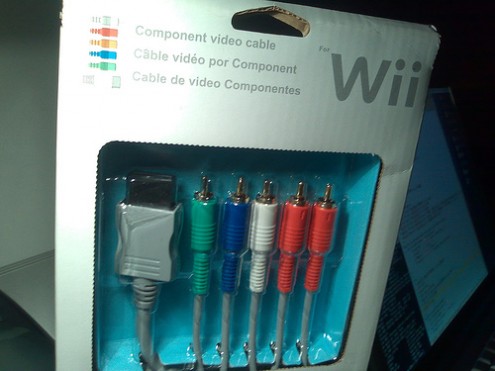
As the old saying goes, “beauty is in the eyes of the beholder.” But if you appreciate crisp graphics, you’ll recognize an immediate improvement when connecting a Wii to an enhanced- or high-definition TV with component cables. I know I did. Steinberg says the same.
“Most people will notice a difference,” he says. “Colors appear more vividly, visuals are sharper in texture, and animations are more vibrant and polished with an upgrade to 480p. It certainly adds more richness to the gaming experience.”
Still, Steinberg cautions those who haven’t yet upgraded to keep their expectations in check. “Compared with the jump to full HD on Xbox 360 or PS3, visual boosts using Wii component cables are relatively minor,” he acknowledges. “And to the lay user simply looking to maximize their gaming dollar, it’s a tougher sell.”
Nevertheless, Steinberg and many other Wii owners already in the know argue that the “jump is worth making.” Especially since component cables may offer the best “return on accessory” of any sold-separately item, being that the cable goes for a mere $5-10 nowadays.
The Wii is not HD. We know that. But until it is, there’s no reason HDTV owners should overlook component cables for enhanced-definition on Wii. The difference, though hardly a revolution, cannot be overstated.


I started playing my Wii on an enhanced definition tube (CRT) TV with the composite cable that was included with my Wii. Then I switched to a component cable and eventually swapped out my TV for an HD monitor. I have to say, the Wii looks better on my screen with component cables!
But I have played Rock Band 2 for Wii on a projector using composite cables at a size of roughly 70″ and it still looked really good .. standing back 8 feet!
It was a week 2 upgrade for me, though something I knew I would do before purchasing the Wii. (I was trying to find a cheaper, but good alternative.)
I switched over a few months ago. It really does make a nice difference on some games (I suppose it makes a difference on all Wii games, but on some it just seems more noticable – like Super Mario Galaxy).
But, where I saw the biggest difference was with the Game Cube games that use it. I went through all my GC games, and about 30 of them have the Progressive Scan feature. Again, some of them didn’t change very much, but some of them were like playing a different game. An example would be the Sonic DX Director’s Cut game – huge difference.
I ordered my cables on line for about 5 bucks, so I’d say that this is one upgrade that is a no-brainer if you have a TV that can handle it.
The only reason I haven’t gotten one for my Wii yet is that my Xbox is already using the sole component-in jack I have on my TV. Of course it has two HDMI slots that I have no use for, but I just bought my TV a couple of years ago and don’t feel that it’s time for an upgrade yet. I know I could just switch cables back and forth but that would become a hassle after a while.
This is my article.
I personally believe that 480p is touted too much. It is fine for the Wii but in comparison to the Xbox’s 1080p output, its next to nothing.
In my experience, keep your Wii attached to your SDTV or at least a lower resolution television.
I made the jump the day I got an HDTV. It makes and improvement but the reason they aren’t selling is because they are unnecessary.
Paying 20 bucks just to go from 480i to 480p just isn’t worth it. Wii games look better and standard def TVs anyways. Even with component cables.
The component cables essentially just make the Wii look sharper- and more pixellated. I mean, it’s a nice jump for those looking to maximize their visual experience but if you haven’t bought them yet, just don’t.
Wait until Nintendo releases a firmware update for 720p or new 1080p digital Wii cables. Or an HD-ready Wii. As it stands, it’s not entirely worth it.
Some games look glorious (Brawl, Galaxy, MP3) but some don’t really benefit at all.
Let’s not forget that the many people who got their TVs from the last generation of CRTs do have Enhanced definition capability in those sets! I have one (in addition to a CRT HDTV), and any Enhanced-enabled game from the GameCube era looks sharper on Enhanced mode than on “HD” mode. CRT TVs have a way of displaying Enhanced mode that is brighter and crispier than in most HDTVs. (I’m talking 480p, not 720p.)
Is there any way to run in 480p widescreen? I’ve got component cables but every time i switch it to 480p the wii changes to 4:3 aspect ratio and if i change it to 16:9 it swaps back to 480i
I’m already hooked up to an HDTV. Looks better. Too much of a hassle to switch settings, so I’m using the cables outta the box. Brawl looks gooooooooooood. The Conduit will look greeeeeeeeeeeeaaaaaaat.
Yeah, 480p! Right! Then comes out Madworld… which doesn’t have a an EDTV feature and only runs at 50Hz and you’re screwed and you have to go back to that fekin’ composite cable that came with the console! Meh! Instead of going for the component I had a go for the good ol’ RGB SCART cable!
That game rocks, but visually seems a game made 9 years ago, when the first batch of PS2 games came out and there was no frigging 60Hz option!
Heck, here in EU component cables for consoles only came out this generation, as all three previous generation’s consoles have that feat stripped out when they crossed the pond, which sucked hard!
Did you guys know that consoles had the option to use component cables with at least enhanced resolution since the SEGA Dreamcast? It’s true… mine has it.
@Muggins: you can run ANY type of image resolution on widescreen. You can “force” the widescreen by changing the aspect ratio on your TV manually. But if the source image is not widescreen but “full” screen, the image will appear stretched horizontally. And if the source is not 480p or higher, it will appear somewhat blurry (CRTs are good at compensating for the blur, though).